
Box Now Delivery
Complete integration for Box Now Delivery. Easily connect your store with seamless and robust syncing.
- 5.0.0Version
- ≥ 6.0WordPress
- ≥ 7.4PHP
- 6PHP files
01
What it does
Written for WooCommerce, without third-party ballast: the same behaviour, fewer queries.
Upgrade your WooCommerce experience with our native Box Now Delivery integration. Enjoy high performance with zero database bloat and native HPOS support. Start managing your store efficiently.
Capabilities
- High Performance Order Storage (HPOS) Ready
- Action Scheduler Asynchronous Syncing
- Full API capabilities & Dashboard reporting
02 — What runs in the background
What the source code actually registers, read from the plugin itself.
- HPOSCompatible with WooCommerce High-Performance Order Storage
- Form safetyEvery submitted form is nonce-checked
- PermissionsEach action checks the user's capabilities (3 checks)
- TranslationEvery string is translatable
Real screen
The Box Now settings
Credentials, button colour and how the locker map appears.
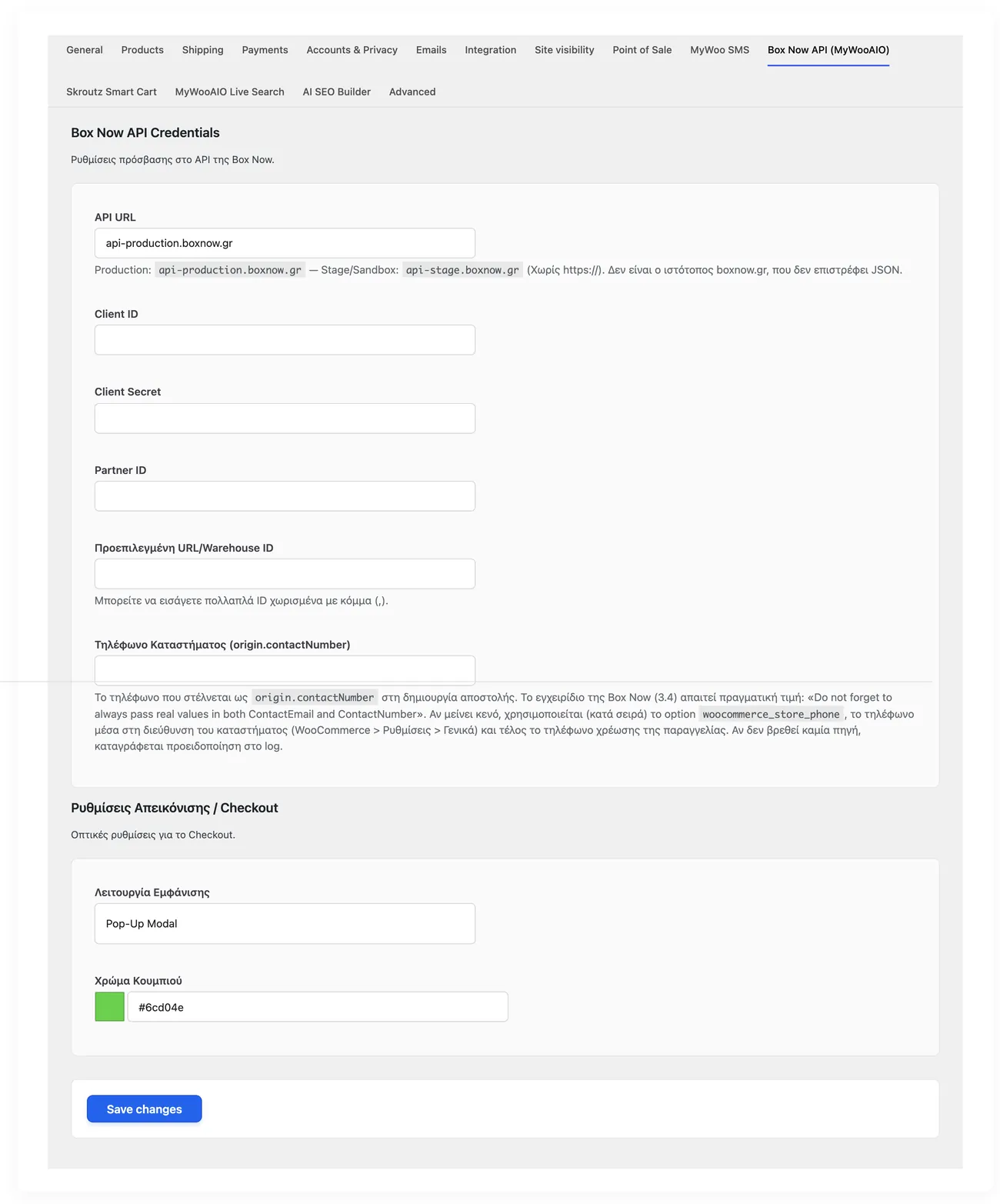
- CredentialsClient ID and Client Secret, as issued by Box Now
- MapThe customer picks a locker without leaving checkout
- VouchersIssue a voucher from inside the order, in the Box Now box
04 — For developers
Every filter and action the plugin fires, with the file and line where it lives.
Filters — 1
- wc_boxnow_settings
Stored settings
14 settings, kept in your own shop database. You manage them from the settings screens and you never edit them by hand.
Setup guide
Box Now lets your customers collect from a locker at a flat rate, without arranging anything with a courier. The plugin sends every order to the locker the customer picked, with no address typed in by hand and without the shopper ever leaving the WooCommerce checkout.
- 1
Get the keys from Box Now
In your Box Now partner account you will find the client id and the client secret. Those two keys are the ticket to the integration: without them the plugin cannot see the locker network. Copy them exactly as they are, with no spaces.
- 2
Enter the keys in WooCommerce
In the admin, on the plugin settings page, the two fields are waiting for the keys. Next to them there is a test mode option: leave it on for the first day so you can place a test order without being charged.
- 3
Show the lockers at checkout
Enable the Box Now shipping method in your shipping zones. At checkout the customer sees a map with the nearby lockers and picks one. The locker address passes into the order on its own, together with its code.
- 4
Run one order from start to finish
Place an order with your own email, pick a locker, pay by cash on delivery or card, then open the order in the admin. You should see the locker code and a label ready to print. If the code is missing, the keys are not correct.
- 5
Turn off test mode
Once everything works in testing, turn test mode off so orders actually leave for the network. Do not forget it: while it is on, no order reaches the lockers.
Common mistakes
- Keys with a space at the start or the end, from copy and paste. The plugin rejects them and the message does not always say why. Retype them by hand if you are unsure.
- A shipping zone without the Box Now method, so the customer never sees lockers and assumes the shop does not support them.
- The method enabled with test mode off, before any testing. The first live orders then reach the network unchecked.
More plugins in this category
Questions
About Box Now Delivery
Is it compatible with custom checkout setups?
Yes. In the MyWooAIO Box Now Connector the integration loads the map correctly through modern Ajax listeners, so it works with the native WooCommerce checkout without changes.
How is this different from the official Box Now plugin?
The official plugin does its job well, but it carries a very large amount of legacy code (1,500+ lines). Our connector focuses purely on speed, does not weigh down your database and follows High-Performance Order Storage (HPOS) all the way.
Licence
Included in the MyWooAIO suite, along with every other plugin, for a single payment.
- Instant 1-click install
- Updates included for life
- Support in Greek
Installation
- Install the MyWooAIO Manager
- Paste your licence key
- One click: the plugin installs and activates itself
- Updates arrive on their own, from the dashboard
Add Box Now Delivery to your shop
One payment, updates included, no subscription.