
ELTA Courier
Complete integration for ELTA Courier. Easily connect your store with seamless and robust syncing.
- 5.0.10Version
- 3PHP files

01
What it does
Written for WooCommerce, without third-party ballast: the same behaviour, fewer queries.
Upgrade your WooCommerce experience with our native ELTA Courier integration. Enjoy high performance with zero database bloat and native HPOS support. Start managing your store efficiently.
Capabilities
- High Performance Order Storage (HPOS) Ready
- Action Scheduler Asynchronous Syncing
- Full API capabilities & Dashboard reporting
02 — What runs in the background
What the source code actually registers, read from the plugin itself.
- HPOSCompatible with WooCommerce High-Performance Order Storage
- Scheduled tasksUses the WordPress cron for recurring work
- Form safetyEvery submitted form is nonce-checked
- PermissionsEach action checks the user's capabilities (5 checks)
- TranslationEvery string is translatable
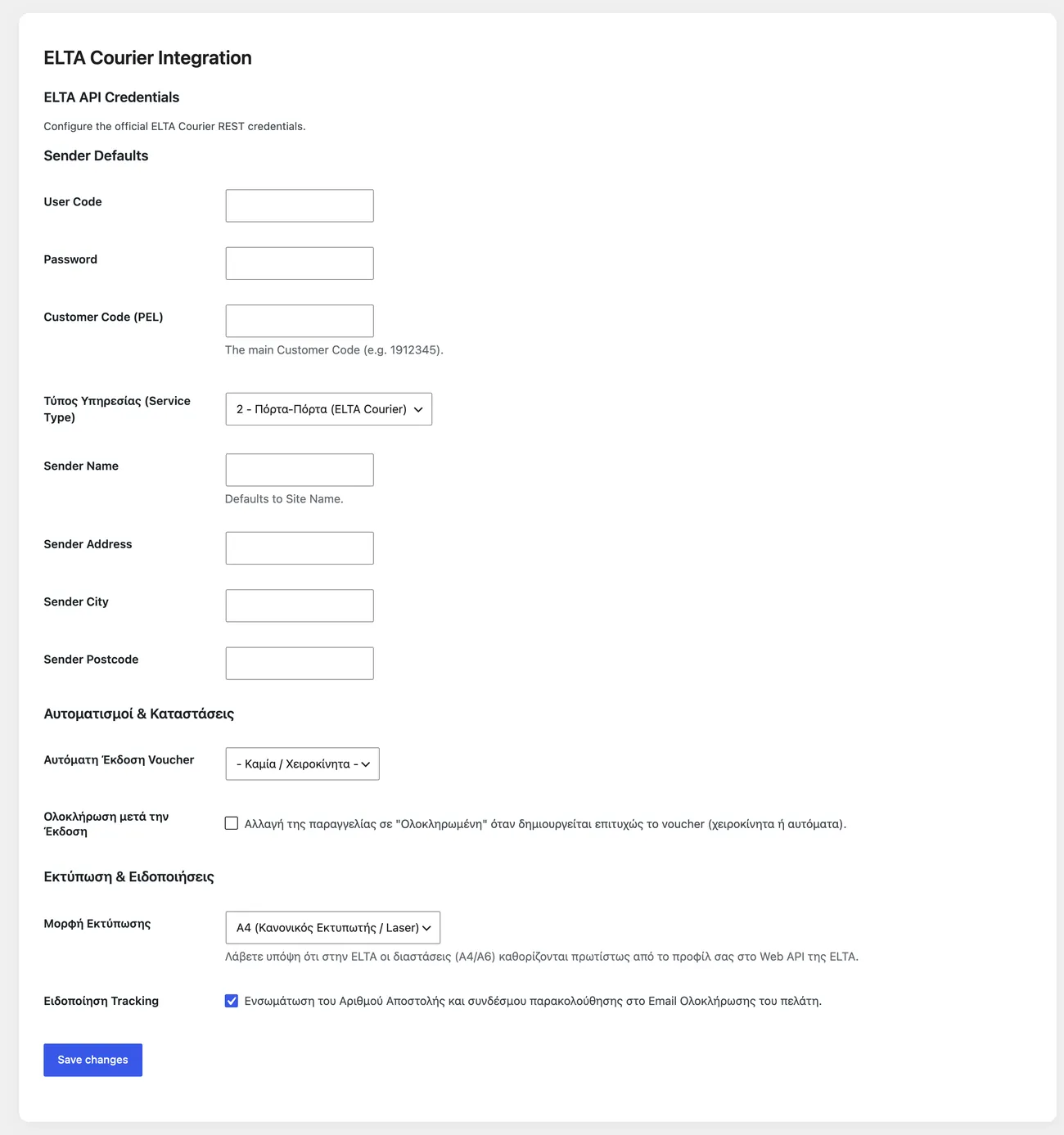
Real screen
The ELTA settings
Credentials and shipping options, on the page that opens from the WooCommerce menu.
Setup guide
ELTA covers areas private couriers often do not serve, and door to door is frequently the only option for islands and villages. The plugin sends the shipment data, keeps the tracking number on the order and produces a label for a thermal printer. It is aimed at shops with a service account at ELTA that want to stop writing shipping notes by hand.
- 1
Get the access details and the customer code
ELTA gives a username and a password for the services, together with the customer code that matches your agreement. The customer code sets the price list and the label format, so ask for written confirmation and not a verbal one. Also ask what the maximum weight and dimensions per parcel are, because ELTA has stricter limits than other carriers and a parcel outside them comes back at the expense of the shop.
- 2
Enter the details and enable the shipping method
In the plugin settings enter the username, the password and the customer code. Then go to the shipping zones and add the method to the zone your account covers. If the shop has its own per-region pricing, this is where you set what you charge the customer, regardless of what you pay ELTA. At least for remote areas set a charge that covers the real cost, because that is where the profit of the other orders is lost.
- 3
Fill in weight and dimensions, or the cost is wrong
The cost at ELTA comes from the weight and, for bulky parcels, from the volume. Fill in weights on your products and check a few orders with many items, because that is where the mistake grows and a product with the wrong weight spoils the whole order. If you sell bulky items, measure your boxes and add dimensions, because volumetric pricing charges the space the parcel takes and not its weight.
- 4
Test one shipment with a real parcel
Place an order with your own email, complete it and create the label from the admin. Check the address, the weight, the payment method and the tracking code on the label, then enter the tracking number on the ELTA website to see whether it is recognised. That last step catches mistakes that do not show on the label, such as an invalid username or a customer code from another agreement.
- 5
Set up retries and customer updates
ELTA services have hours when they do not respond, and then the shipment fails through no fault of the shop. Enable the shipment retry so it tries again on its own, and make sure the WordPress scheduled tasks are running, because on a shop with little traffic they do not start by themselves and the retry never happens. Then check that the customer receives the tracking number by email, so they do not have to call.
Common mistakes
- Products without weight. The charge comes out at the minimum kilo and the difference is lost on every order.
- The same shipping charge for the whole country, so remote orders are sold at a loss.
- A test account on a production shop. Labels are produced normally but the tracking number is never recognised.
- A thermal label printed on an A4 sheet scaled down. The barcode cannot be read and the parcel comes back to the shop.
More plugins in this category
Questions
About ELTA Courier
What happens if the ELTA servers are slow or go down?
The data is submitted in the background, so your screen does not hang. If a request fails, it is tried again.
Is the weight calculated automatically?
Weight is converted automatically and volumetric weight is taken into account. So you do not fill in weight on every order.
Can I produce all the labels in one go?
Yes, labels can be merged into a single file for bulk printing. Thermal printer formats are supported too.
Does the customer see the tracking number?
Yes, the number goes into the order email template automatically. You do not have to send it by hand.
Does the server need anything?
An account on the ELTA web services and working scheduled tasks. There is also an insured value option.
Licence
Included in the MyWooAIO suite, along with every other plugin, for a single payment.
- Instant 1-click install
- Updates included for life
- Support in Greek
Installation
- Install the MyWooAIO Manager
- Paste your licence key
- One click: the plugin installs and activates itself
- Updates arrive on their own, from the dashboard
Add ELTA Courier to your shop
One payment, updates included, no subscription.