
[tbigr_shortcode_larg]Renders the large financing notice for TBI Bank, with a title, a logo and a link.
Where: Product page, homepage, or a page with payment information.
Parameters: background, title, link, color, font_size, logo.
Complete integration for TBI Bank BNPL. Easily connect your store with seamless and robust syncing.

01
Written for WooCommerce, without third-party ballast: the same behaviour, fewer queries.
Upgrade your WooCommerce experience with our native TBI Bank BNPL integration. Enjoy high performance with zero database bloat and native HPOS support. Start managing your store efficiently.
Capabilities
02 — What runs in the background
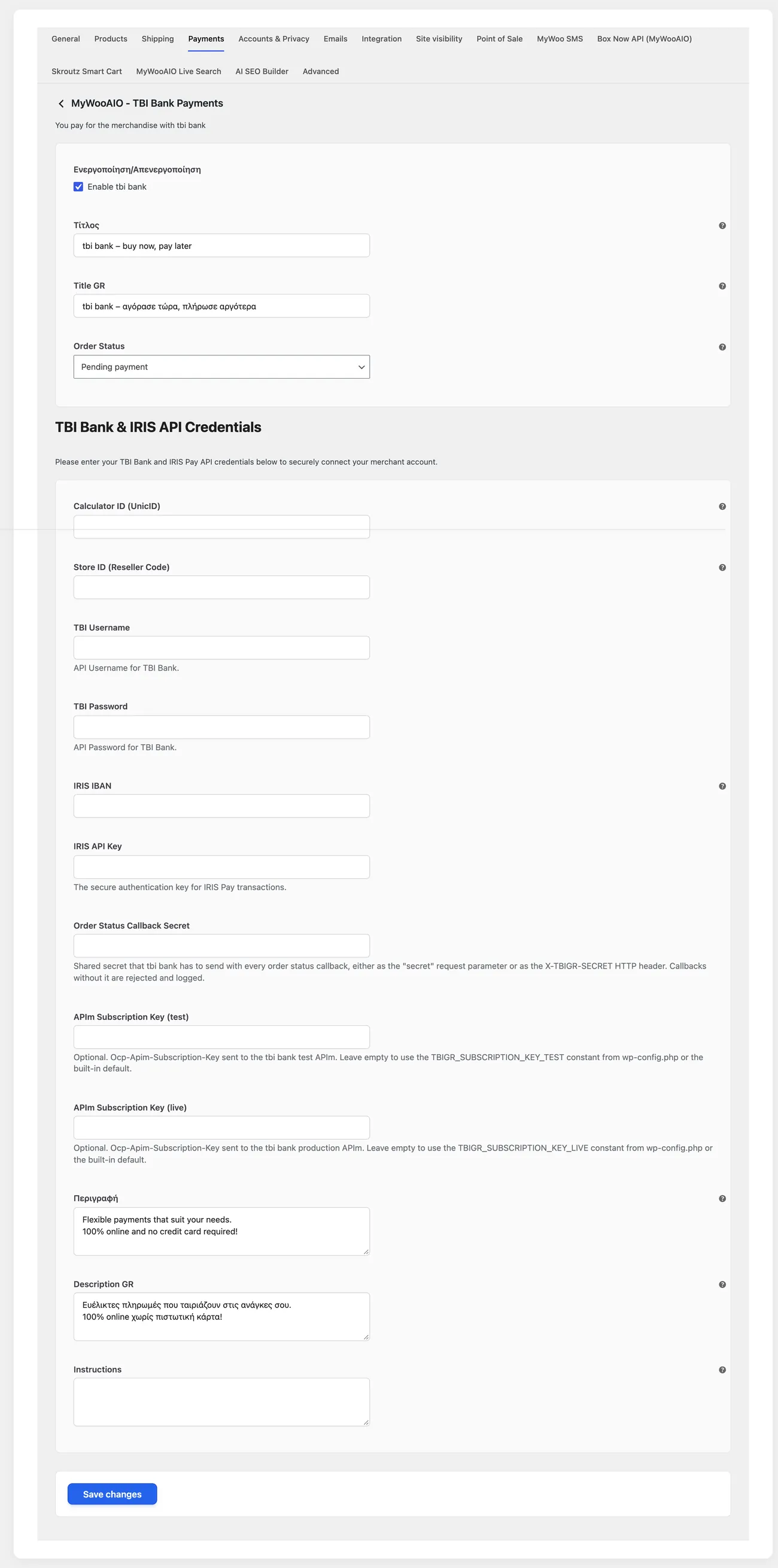
Real screen
The same key in two versions, one for testing and one for real orders.
Shortcodes
Copy the shortcode into any page, post or widget area.
[tbigr_shortcode_larg]Renders the large financing notice for TBI Bank, with a title, a logo and a link.
Where: Product page, homepage, or a page with payment information.
Parameters: background, title, link, color, font_size, logo.
[tbigr_shortcode_small]The same message in a compact form, for spots where space is tight.
Where: Next to the price, inside the product description, or in the cart.
Parameters: background, title, color, font_size, logo.
04 — For developers
Filters — 2
Stored settings
14 settings, kept in your own shop database. You manage them from the settings screens and you never edit them by hand.
The TBI Bank programme gives instalments to customers who do not have, or do not want to use, a credit card. The plugin sends the basket details to the checks of the bank, shows the customer the instalment and changes the order status when the bank responds. It is aimed at shops with a signed financing agreement.
After the agreement the bank gives the merchant identifier, the integration key and the address of the test environment. The identifier is usually the tax number of the business, so make sure you use the right one and not the tax number of another company in the group. Ask in writing which criteria the bank checks for approval, because the criteria decide which customers will eventually see the method.
In the plugin settings enter the identifier and the key and leave the test environment on. Enable the payment method and give it a title that explains the customer pays in instalments without a card, because a customer who sees an unfamiliar bank name at checkout usually picks cash on delivery. Set a minimum order amount, so no request is sent for a basket that is not going to be approved.
Enable the instalment calculator that shows the customer how much they pay each month and make sure it pulls the correct price, along with any active discount or offer. Open the page from a phone and check that it does not slow the load, because a calculation that makes an external request on every visit cuts page speed. Check whether the shop has products the agreement excludes and hide the calculator from them.
Submit an application with your own details in the test environment and see how long the bank takes to respond, because if it takes minutes the customer will abandon the checkout. Then try an application that gets declined, with details that do not meet the criteria, and make sure the customer gets a clear message and stays on the page with their cart. Note the identifier of each application, because the bank will ask for it in every discussion.
When the bank approves, the order should move to processing without any action from you. Open the order and see whether it records which application approved it and what amount was financed, because you need those details when you reconcile with your accounting. If an application was approved and the order stayed pending, the problem is usually in the notifications that do not reach the shop.
Enter the production keys, turn test mode off and make a small real purchase. Decide who will check every morning the orders waiting for a bank response, because an application approved late and forgotten is an order that never shipped, with a customer committed to instalments for a product they never saw. Write the rule down and add a reminder for public holidays.
Questions
Yes. You need a signed agreement for the instalment programme and a Greek tax number (AFM). Without them the add-on cannot request approval for the customer.
Approval comes back online, with no phone call and no paperwork. Once it is approved, the order moves to processing on its own.
Yes, you set a minimum order amount in the settings. Below that amount the method does not show at checkout.
Yes, the product page carries an instalment calculator. So they know in advance what they will pay each month.
Yes, there is a test mode in the settings. You switch it off when you are ready to move to live transactions.
Licence
Installation
One payment, updates included, no subscription.