

All plugins
Payments & BNPLVersion 5.0.0

Klarna Payments

Complete integration for Klarna Payments. Easily connect your store with seamless and robust syncing.

  • 5.0.0Version
  • 177PHP files

01

What it does

Written for WooCommerce, without third-party ballast: the same behaviour, fewer queries.

Upgrade your WooCommerce experience with our native Klarna Payments integration. Enjoy high performance with zero database bloat and native HPOS support. Start managing your store efficiently.

Capabilities

  • High Performance Order Storage (HPOS) Ready
  • Action Scheduler Asynchronous Syncing
  • Full API capabilities & Dashboard reporting

02 — What runs in the background

What the source code actually registers, read from the plugin itself.

  • HPOSCompatible with WooCommerce High-Performance Order Storage
  • Action SchedulerHeavy jobs run in the background queue
  • REST APIEndpoints:
  • Shortcode[onsite_messaging]
  • Form safetyEvery submitted form is nonce-checked
  • PermissionsEach action checks the user's capabilities (1 checks)
  • TranslationEvery string is translatable

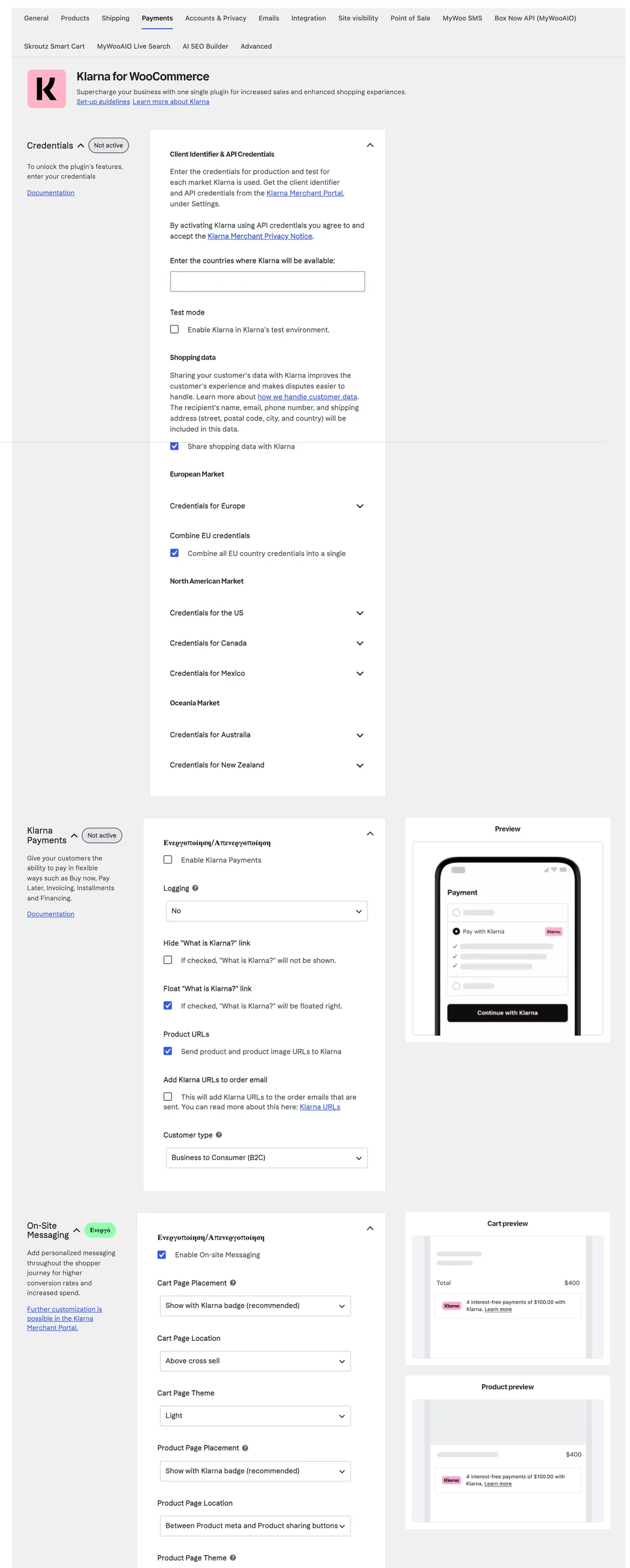
Real screen

The Klarna settings

Credentials per market, with separate test credentials.

Οι ρυθμίσεις της πύλης Klarna
WooCommerce → Settings → Payments → KlarnaOpen full size
  • TestingA test mode exists, with separate credentials for each market

Shortcodes

How to place it

Copy the shortcode into any page, post or widget area.

[onsite_messaging]

Renders the official Klarna instalment message, such as "3 interest-free instalments of €23.33". The content comes from Klarna, not from us.

Where: Banner on the homepage, product page or cart. There are also automatic placements from the settings, with no shortcode involved.

Parameters: data-key: the placement key from the Klarna Merchant portal (default homepage-promotion-wide). data-theme: default, dark or custom. data-purchase-amount: the amount. Left empty, it picks up the product price or the cart total on its own.

04 — For developers

Every filter and action the plugin fires, with the file and line where it lives.

Filters — 59

  • kp_blocks_order_button_label_free
  • kp_blocks_order_button_label
  • kp_blocks_logo
  • wc_kp_extra_debug
  • wc_klarna_payments_process_refund
  • kp_websdk_data_client_id
  • wc_kp_remove_postcode_spaces
  • wc_kp_checkout_params
  • kp_enable_express_button
  • kp_express_button_locale
  • wc_gateway_klarna_payments_settings
  • wc_kp_request_timeout

Actions — 18

  • kp_modal_closed
  • kp_after_place_order
  • wc_klarna_notification_listener
  • wc_klarna_payments_accepted
  • wc_klarna_accepted
  • wc_klarna_payments_pending
  • wc_klarna_pending
  • wc_klarna_payments_rejected
  • wc_klarna_rejected
  • osm_shortcode_added
  • siwk_merge_with_existing_user
  • kec_auth_callback_processed

Stored settings

14 settings, kept in your own shop database. You manage them from the settings screens and you never edit them by hand.

Setup guide

Instalments raise the completion rate on mid-value baskets, because the customer does not have to pay the full amount upfront. The plugin opens the Klarna flow inside the checkout page, with no redirect to another site, and keeps the refunds on the order. It is aimed at shops with a Klarna agreement.

  1. 1

    Get the Klarna account details

    You need the identifier and the password Klarna issues after the agreement, together with the matching test details. Most installations start with the production details and then never dare to touch anything, so ask for both pairs from the start. Keep the keys out of emails and chats, because with them someone else can create payments in your name without you noticing.

  2. 2

    Enter the details and leave test mode on

    On the plugin settings page enter the identifier and the password, enable the payment method and leave test mode on. Give the method a title that describes what will happen, for example "Pay in three interest-free instalments", and not the company name, because the customer does not know what Klarna means but understands what three instalments mean. Keep the method visible only to those who can complete the flow, so the customer is not put through a decline at the end for nothing.

  3. 3

    Set amount limits for the method

    Klarna approves different amounts per customer and a very small amount makes no sense to pay in instalments. Set a minimum order amount that at least covers the transaction cost and let the method hide itself on smaller baskets, so the customer is not shown an option that will be declined. Check whether the shop has products or categories that the agreement excludes and hide the method from them, because a decline at checkout costs the whole sale.

  4. 4

    Check the message on the product pages

    The plugin can show next to the price how much the customer pays per instalment. Enable it only on products that are allowed, because a message above an excluded product promises something that will not apply at checkout. Open a product page from a phone and make sure the message does not break the layout and does not cover the buy button, because that is where most sales are lost.

  5. 5

    Run a purchase, a decline and a refund

    Buy a cheap product with the test details and complete the flow, checking that the order opened in the admin with the first instalment amount. Then try a purchase that gets declined, to confirm the customer stays on the checkout page with a clear message and the cart is not emptied. At the end issue a refund from the order and see the amount return to Klarna without a second action on the company side.

  6. 6

    Go live with a small purchase

    Enter the production details, turn test mode off and make a small purchase with your own card. Check three things: that the order closed on its own, that the customer received the order email and that the transaction appears in your Klarna account. If something is missing, do not touch the keys but look first at the method configuration and the status of your account.

Common mistakes

  • Test details on a live shop. Payments look successful and are never settled.
  • A method with no minimum amount. The customer sees instalments on a ten euro basket and the fee eats the profit of the order.
  • The instalment message enabled on excluded products. The customer reaches checkout and finds a different price from the one the page promised.
  • Testing on desktop only. On a phone the flow opens differently and the order often does not close.

Questions

About Klarna Payments

Why not just use the free Klarna plugin?

The free standalone plugin loads its scripts across the whole site and often breaks your checkout through conflicts with other JavaScript. The MyWooAIO module loads only when the customer picks Klarna, and only the bytes that are actually needed.

Licence

Included in the MyWooAIO suite, along with every other plugin, for a single payment.

  • Instant 1-click install
  • Updates included for life
  • Support in Greek

Installation

  1. Install the MyWooAIO Manager
  2. Paste your licence key
  3. One click: the plugin installs and activates itself
  4. Updates arrive on their own, from the dashboard

Add Klarna Payments to your shop

One payment, updates included, no subscription.