
Piraeus epay eCommerce
Complete integration for Piraeus epay eCommerce. Easily connect your store with seamless and robust syncing.
- 5.0.17Version
- 2PHP files

01
What it does
Written for WooCommerce, without third-party ballast: the same behaviour, fewer queries.
Upgrade your WooCommerce experience with our native Piraeus epay eCommerce integration. Enjoy high performance with zero database bloat and native HPOS support. Start managing your store efficiently.
Capabilities
- High Performance Order Storage (HPOS) Ready
- Action Scheduler Asynchronous Syncing
- Full API capabilities & Dashboard reporting
02 — What runs in the background
What the source code actually registers, read from the plugin itself.
- PermissionsEach action checks the user's capabilities (1 checks)
- TranslationEvery string is translatable
Real screen
The Piraeus gateway settings
The gateway is configured where every payment method is, with no separate menu.
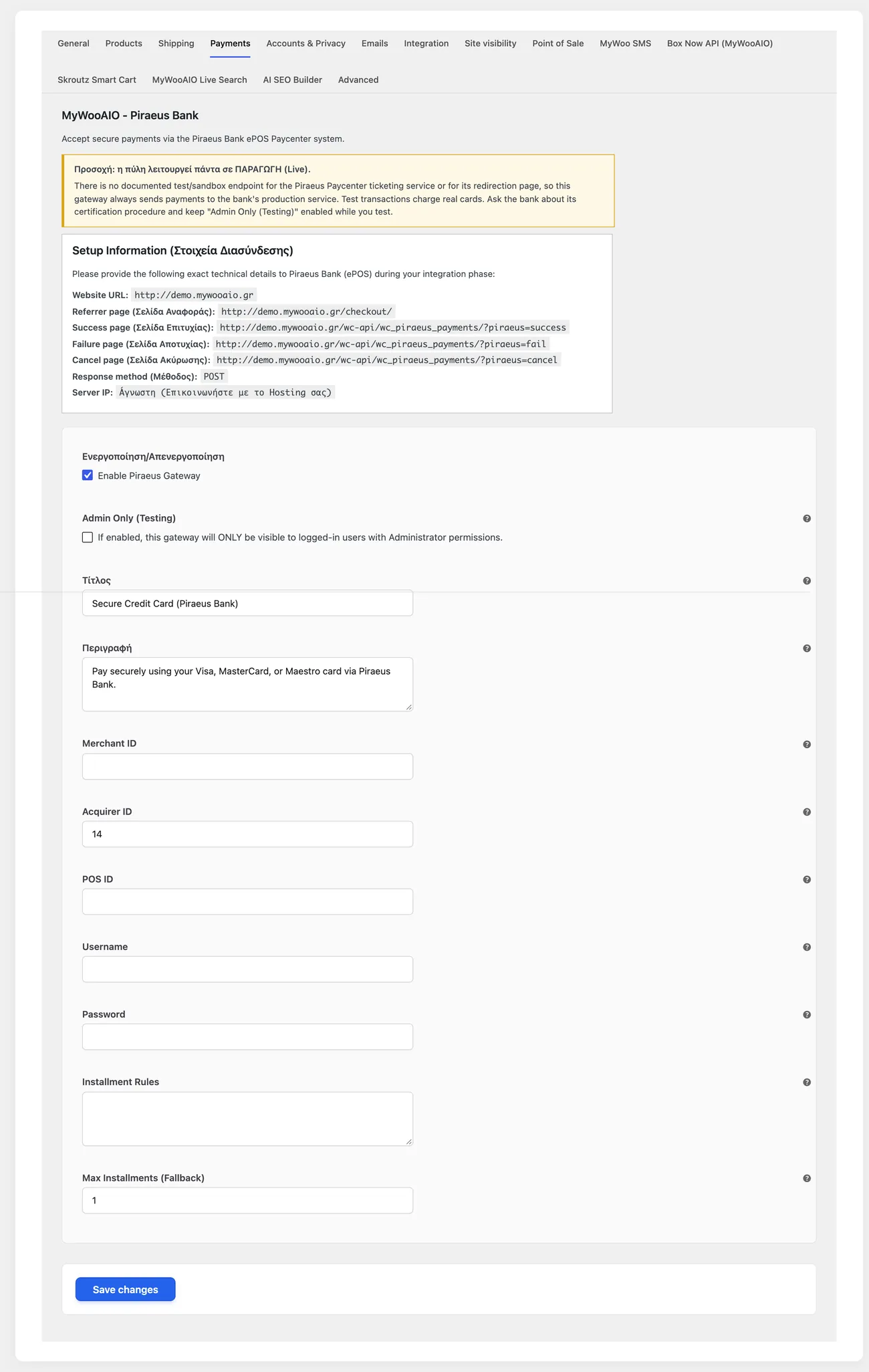
- Test environmentNone. The plugin itself states this inside its settings, so nobody assumes otherwise.
- TestingThe bank issues test cards for a few transactions on the live environment
- Admin Only (Testing)An option to test without showing the gateway to customers
Setup guide
The epay service of Piraeus Bank is one of the most common integrations in Greek shops, and this plugin brings it inside WooCommerce with clean payment statuses. The payment happens on a secure bank page and the customer comes back with the result, so the order closes on its own in most cases. It is aimed at shops with an active epay agreement that want to accept cards, instalments and cancellations from the admin.
- 1
Ask Piraeus for the terminal and API credentials
The bank gives the merchant number, the terminal number and the access codes for the ticket service, the system that creates and checks every transaction. Confirm that the agreement covers card-not-present transactions, because agreements for a physical terminal do not accept online payments. Ask in writing which credentials belong to the test environment and which to production, because that is where most of the days of an installation are lost.
- 2
Check the secure protocol and the return page
The customer leaves the shop for the bank page and comes back with the payment result. If the return page asks for a login or does not open, the order stays pending while the card has already been charged. Open the page in a private window and make sure it loads. The shop also has to run on a valid security certificate, otherwise the card authentication fails for security reasons and the customer does not understand why.
- 3
Enter the credentials and enable the method
In the plugin settings enter the merchant number, the terminal number, the bank code you settle through and the service codes. Choose the test environment and enable the payment method. Set the title and description the customer sees, and if the agreement includes instalments, enable them with a minimum amount, because instalment fees on a ten euro basket eat the profit of the order.
- 4
Test a payment, a decline and a closed window
Buy something with your own card and watch the order move to a paid status. Then try a card that gets declined, to confirm the customer gets a message and the cart stays intact. Third test: start a payment and close the window before it completes. The order will stay on hold, and that is where you find out whether the plugin eventually asks the bank for the result or whether the transaction is lost and the order stays open forever.
- 5
Go live and set a routine for pending orders
Enter the production keys, turn test mode off and run one small transaction. Then agree on a rule for the shop: every morning you open the orders left in pending payment and check them in the bank system, because an order that was charged and never closed is a lost sale and an angry customer. Run a test refund at the end too, so you know it works before you actually need it.
Common mistakes
- Terminal credentials from a physical store, with no online transactions enabled. The method shows up as usual and every payment is declined.
- A return page that requires a login or has changed address after a redesign of the shop.
- Orders in pending payment that are never checked. The shop thinks it was not paid and sends a reminder to a customer who has already been charged.
- Testing on desktop only. On a phone the return from the bank opens in another tab and the order often does not close, so test from a phone as well.
More plugins in this category
Questions
About Piraeus epay eCommerce
What if the customer closes the page before finishing payment?
A fallback notification mechanism keeps the order status from staying unclear. You do not have to check the bank system yourself.
How are the interest-free instalments set up?
You define them in your own matrix form, according to your agreement. The form then shows at checkout.
Which details do I need from the bank?
The merchant code, the transaction identifier, the POS ID and the Ticketing service username. You also need an active Ticketing service and a secure connection.
How do I find out what went wrong with a failed transaction?
The full payload of every call to the bank is logged. That way you spot the cause of the problem quickly.
Do I need a static IP address?
Only if the bank's firewall requires one. In most cases an active Ticketing service and strong encryption are enough.
Licence
Included in the MyWooAIO suite, along with every other plugin, for a single payment.
- Instant 1-click install
- Updates included for life
- Support in Greek
Installation
- Install the MyWooAIO Manager
- Paste your licence key
- One click: the plugin installs and activates itself
- Updates arrive on their own, from the dashboard
Add Piraeus epay eCommerce to your shop
One payment, updates included, no subscription.