
Skroutz XML Feed
Complete integration for Skroutz XML Feed. Easily connect your store with seamless and robust syncing.
- 5.0.0Version
- 3PHP files

01
What it does
Written for WooCommerce, without third-party ballast: the same behaviour, fewer queries.
Upgrade your WooCommerce experience with our native Skroutz XML Feed integration. Enjoy high performance with zero database bloat and native HPOS support. Start managing your store efficiently.
Capabilities
- High Performance Order Storage (HPOS) Ready
- Action Scheduler Asynchronous Syncing
- Full API capabilities & Dashboard reporting
02 — What runs in the background
What the source code actually registers, read from the plugin itself.
- Scheduled tasksUses the WordPress cron for recurring work
- Form safetyEvery submitted form is nonce-checked
- PermissionsEach action checks the user's capabilities (4 checks)
Real screen
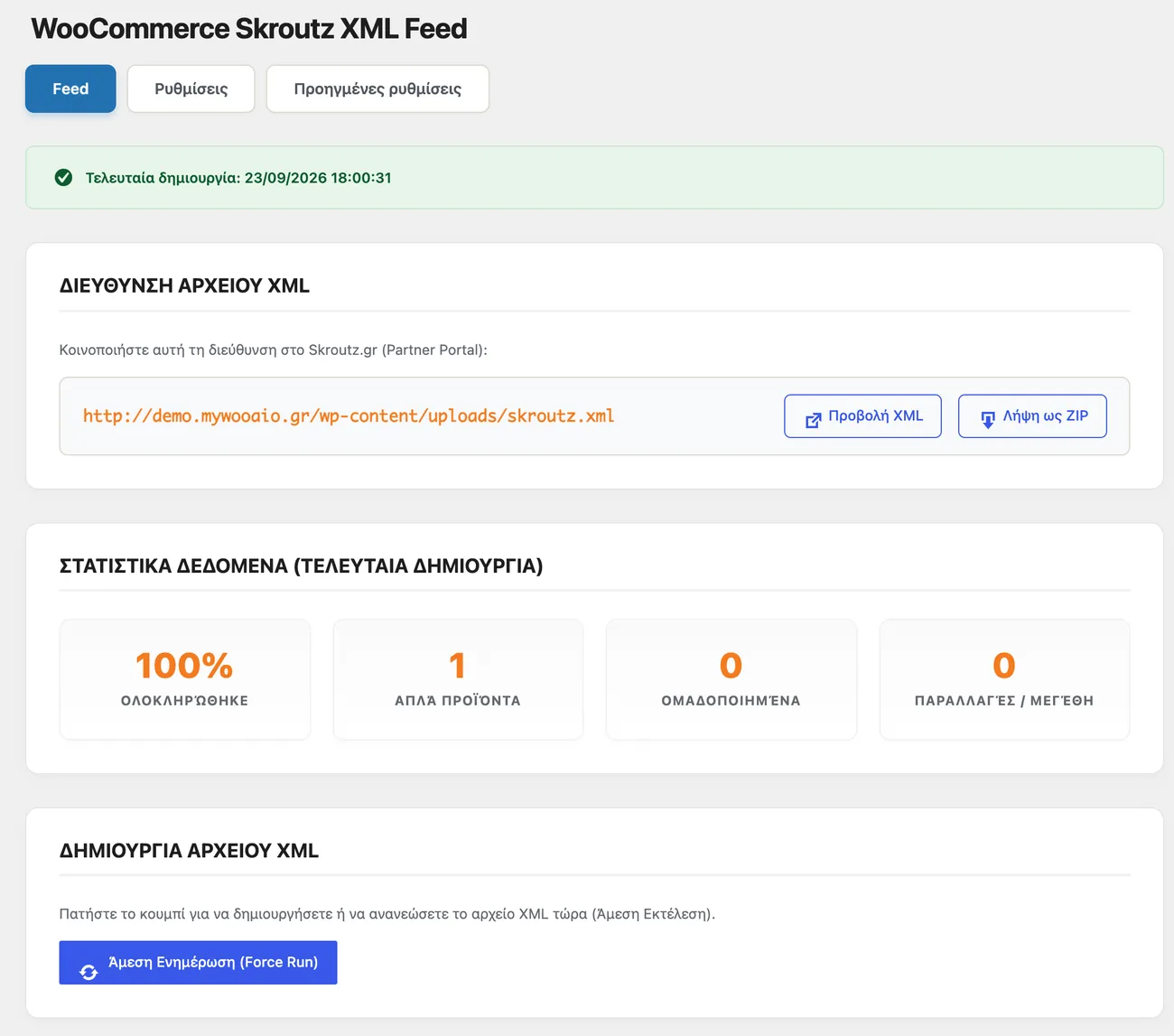
The Skroutz feed settings
Which products enter the feed and by which rules, with the XML URL generated by the store itself.
Setup guide
Skroutz is one of the biggest sources of traffic for Greek shops, and the product feed is how it finds you. The plugin streams the feed, without loading the whole catalogue into server memory, so it holds up on shops with thousands of SKUs. It is aimed at shops that want control over availability, delivery time and the prices a Skroutz visitor sees.
- 1
Clean up the catalogue before generating the feed
Skroutz hides products that have no price, image, description or category, and the rejections show up as lost traffic with no error message in the shop. Before you turn the feed on, go through the products you want to promote and make sure their price, image and category are set. Look separately at products with a zero price, because a zero price in a feed does not mean free, it means the listing is rejected.
- 2
Turn on the feed and choose what it contains
Enable feed generation in the settings and decide whether out-of-stock products are included. Out-of-stock products, if sent with zero availability, keep their page on Skroutz, which helps you not lose positions when you restock. Also set a delivery time for the items available immediately and for backorders, because a delivery time you do not meet is charged in positions and cancellations.
- 3
Register the feed in the Skroutz panel
In the partner panel, where you register the shop feeds, add the address the plugin gives you. Then request a manual read, so you do not wait for the next scheduled one, and see how many products passed and how many were rejected. If the rejections are many, the problem is in the product fields and not in the feed, so fix the three most common first and try again before looking elsewhere.
- 4
Lock down the refresh frequency
Set how often the feed is refreshed and make sure the task that builds it actually runs, by opening the feed in a private window and checking how recent it is. Skroutz reads the feed at its own pace, so a price change is not visible immediately but takes a few hours. If the feed is not refreshed, Skroutz shows old prices and customers arrive with the wrong expectation, which is worse than not being visible at all.
- 5
Check after every big catalogue change
Every time a new category is added, the variant structure changes or a large batch of products goes up, open the feed and check a sample of ten products for price, stock and image address. Mistakes in a feed do not show in the shop, they show on Skroutz, and you usually find them days later. Also keep a note of the rejections of the month, because that shows whether the problem is in one category or in individual products.
Common mistakes
- Products without an image or with a zero price. Skroutz drops them and the loss does not show in the shop reports.
- A feed that is not refreshed, because WordPress scheduled tasks do not run on a shop with little traffic.
- Variants sent as one product with one price. Customers see a price that does not exist and blame the shop.
- Checking the feed only while the catalogue is small. After the first big load, memory and execution limits cut the feed in half.
More plugins in this category
Questions
About Skroutz XML Feed
Will my server fall over with thousands of products?
No, products are not all loaded into memory at once. The feed is built in chunks, so it holds up with large catalogues too.
How is the delivery time declared?
You set a separate time for items in stock and for items on backorder. Ready-made options are included.
Can I leave products out of the feed?
Yes, you can exclude hidden products and out-of-stock products. There is also an SKU prefix if you want to tell your codes apart.
What happens with variations and images?
Variations and availability go into the feed automatically. Images are fetched and optimised automatically as well.
What does it need to run without interruptions?
Working scheduled tasks and a PHP memory limit above 256MB. That way the feed finishes building every time.
Licence
Included in the MyWooAIO suite, along with every other plugin, for a single payment.
- Instant 1-click install
- Updates included for life
- Support in Greek
Installation
- Install the MyWooAIO Manager
- Paste your licence key
- One click: the plugin installs and activates itself
- Updates arrive on their own, from the dashboard
Add Skroutz XML Feed to your shop
One payment, updates included, no subscription.