
Skroutz Analytics CPS
Complete integration for Skroutz Analytics CPS. Easily connect your store with seamless and robust syncing.
- 5.0.0Version
- 3PHP files

01
What it does
Written for WooCommerce, without third-party ballast: the same behaviour, fewer queries.
Upgrade your WooCommerce experience with our native Skroutz Analytics CPS integration. Enjoy high performance with zero database bloat and native HPOS support. Start managing your store efficiently.
Capabilities
- High Performance Order Storage (HPOS) Ready
- Action Scheduler Asynchronous Syncing
- Full API capabilities & Dashboard reporting
02 — What runs in the background
What the source code actually registers, read from the plugin itself.
- HPOSCompatible with WooCommerce High-Performance Order Storage
- Form safetyEvery submitted form is nonce-checked
- PermissionsEach action checks the user's capabilities (2 checks)
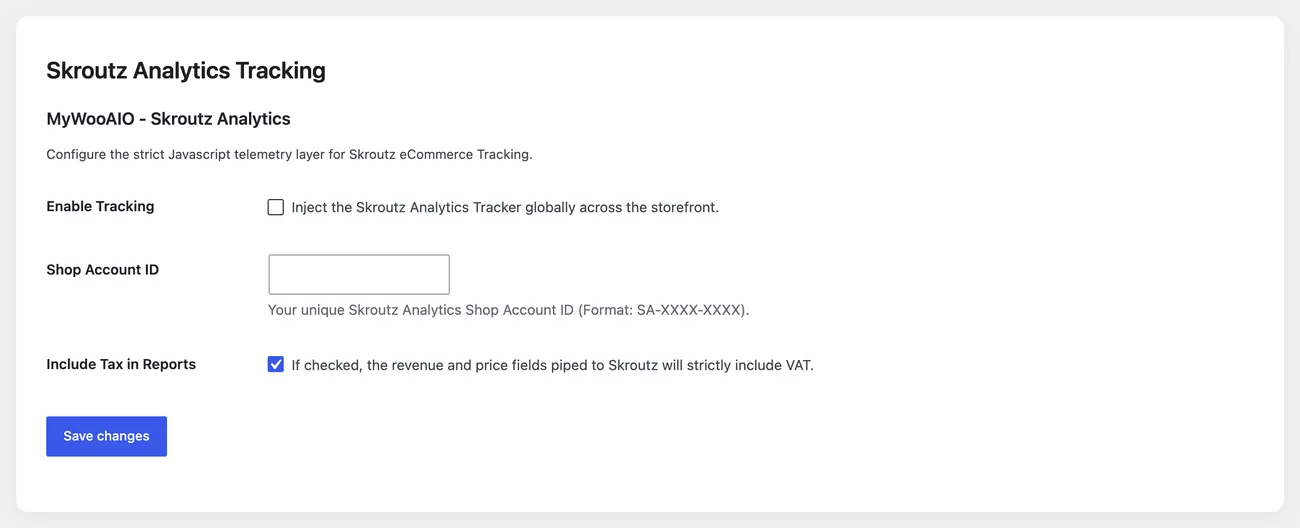
Real screen
The Skroutz Analytics settings
A short, specific screen: what is needed to measure the comparison, nothing more.
04 — For developers
Every filter and action the plugin fires, with the file and line where it lives.
Filters — 1
- wc_skroutz_analytics_settings
Stored settings
9 settings, kept in your own shop database. You manage them from the settings screens and you never edit them by hand.
Setup guide
The Skroutz tracking code measures the sales that came from Skroutz, and both your billing and your position depend on that measurement. The plugin sends the order details after removing tax and shipping, so that commission is not charged on delivery costs. It is for shops that are on the pay per sale programme.
- 1
Get the store ID and the tracking key
In the Skroutz partner panel you will find the store number and the key of the tracking service. Keep both, because one identifies the store and the other signs the data being sent. If the shop runs in several languages or has more than one location on the same account, make sure which ID belongs to which address before you enter them. Keep them somewhere safe and do not pass them around by email, because the data the shop sends is signed with them.
- 2
Enter the details and turn on tracking
In the settings enter the store number and the key and turn on tracking. Check that the code loads on every page and not only on the home page, because if it is missing from the product page you lose the traffic that actually counts. Open a product page and a category page in a window with no login, to make sure they do not depend on your own admin session.
- 3
Set up the tax and shipping removal
Turn on the removal of tax and shipping, so that the amount sent to Skroutz is the net amount of the products. If the shop has products with different rates, check that they are calculated one by one and not with a single rate, because a mistake here shows up on every Skroutz invoice. If there are products excluded from commission, declare them so they are not counted.
- 4
Check consent
If the shop asks for consent before loading tracking tools, make sure the Skroutz code respects the same decision, because otherwise you either measure nothing or you measure without permission. Try one visit without accepting and one with accepting and see what reaches Skroutz, so you know what to show if you are ever audited. The setting has to behave the same on desktop and on mobile.
- 5
Make a real purchase and check the measurement
Buy a cheap product with your own email, then open the Skroutz panel and see whether the sale was recorded, with the net amount you expect and not the total. Check that it was recorded once, because double recording means double billing, and that the product shown is the one you bought. If the amount does not match, the mistake is in the tax or the shipping calculation.
- 6
Set up a monthly check of the charges
Once a month open the Skroutz charge and compare the sales you were billed for against the orders you actually had, because differences are not rare and usually come from cancellations or returns. Look separately at the orders that were cancelled after the measurement and ask for a correction if you need one, within the period the agreement sets. Keep the charge details together with the invoices of the month.
Common mistakes
- A single tax rate on products with different rates. The amount sent does not match and the charge comes out wrong.
- Shipping left inside the amount. The shop pays commission on delivery costs, which are not a sale.
- A code that does not load on every page. You measure only part of the traffic Skroutz brings you.
- Consent that is ignored. The code loads before permission and the shop is exposed in an audit.
More plugins in this category
Questions
About Skroutz Analytics CPS
Am I charged Skroutz commission on shipping too?
No, shipping is subtracted from the amount that is sent. So commission is calculated on the net value of the products.
Does the amount sent include VAT?
No, VAT is removed before the amount goes out, so the data is accounting-correct, and the deduction is on from the start.
What about products that carry no VAT?
Multiple tax classes and exemptions are supported. So VAT is not deducted from products that do not carry any.
Will the look of the page be affected?
No, the code is injected cleanly and does not touch the page structure. It creates no conflicts with other plugins.
What do I need to get it running?
The shop ID and the key Skroutz gives you. WooCommerce 8.0 or newer is also required.
Licence
Included in the MyWooAIO suite, along with every other plugin, for a single payment.
- Instant 1-click install
- Updates included for life
- Support in Greek
Installation
- Install the MyWooAIO Manager
- Paste your licence key
- One click: the plugin installs and activates itself
- Updates arrive on their own, from the dashboard
Add Skroutz Analytics CPS to your shop
One payment, updates included, no subscription.