
Google Consent Mode v2
Complete integration for Google Consent Mode v2. Easily connect your store with seamless and robust syncing.
- 5.0.1Version
- 2PHP files

01
What it does
Written for WooCommerce, without third-party ballast: the same behaviour, fewer queries.
Upgrade your WooCommerce experience with our native Google Consent Mode v2 integration. Enjoy high performance with zero database bloat and native HPOS support. Start managing your store efficiently.
Capabilities
- High Performance Order Storage (HPOS) Ready
- Action Scheduler Asynchronous Syncing
- Full API capabilities & Dashboard reporting
02 — What runs in the background
What the source code actually registers, read from the plugin itself.
- TranslationEvery string is translatable
Real screen
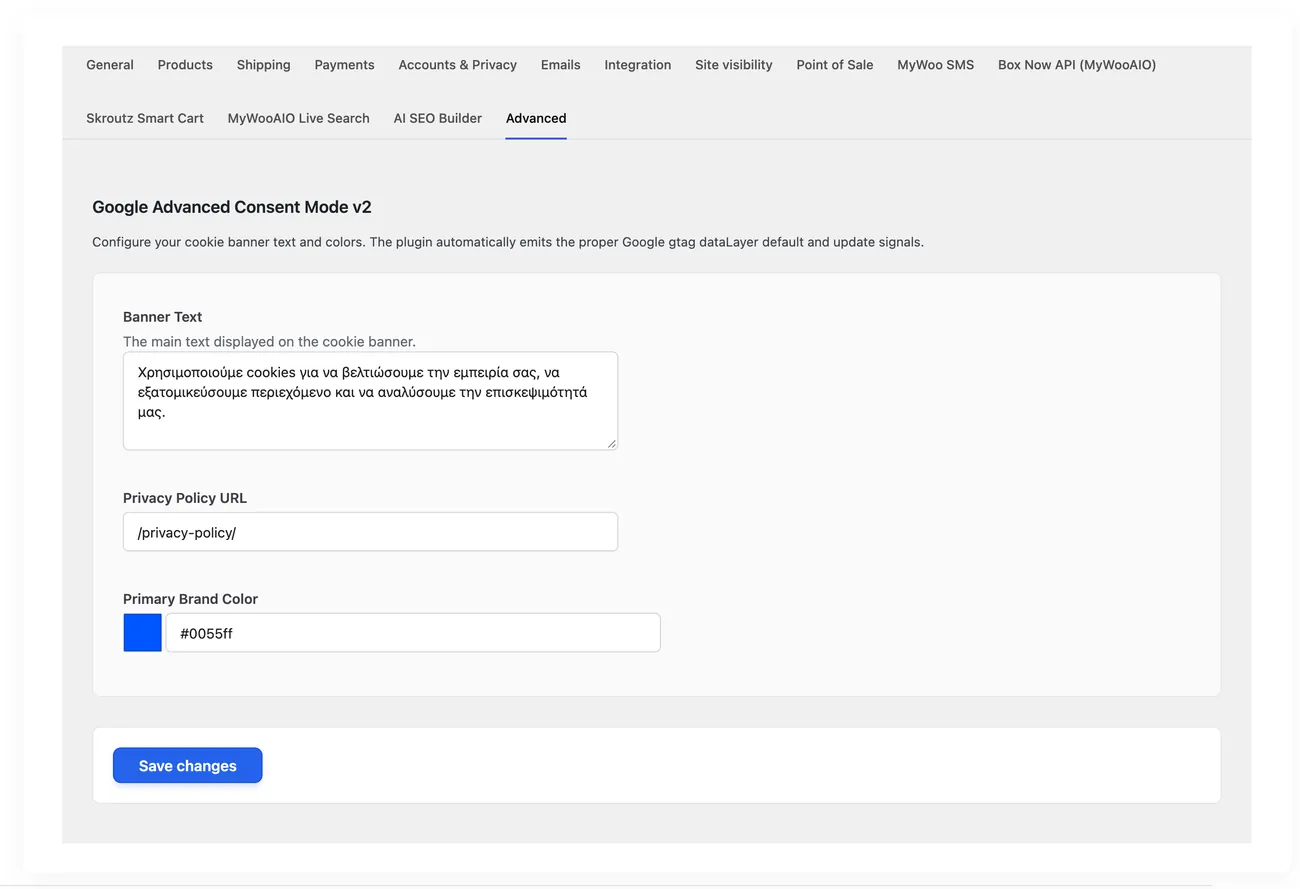
The consent settings
Which measurement tools are allowed before and which after consent.
Setup guide
Google requires the consent signal to be sent before its tools load, and without it advertising accounts risk suspension. The plugin sends the right signals before the scripts and manages the choices banner. It is for shops that use Google tools and take visitors from Europe.
- 1
Check the order in which the scripts load
The plugin depends on the signals going out before the first Google tool loads, so open the page source and make sure the block with the signals appears before the measurement scripts. If the theme or another plugin loads the tools higher up, the setting is pointless, because the signals arrive late. Fix the order or turn off the other plugin that loads them.
- 2
Set up the consent categories
Decide which categories the banner asks for: analytics, advertising, storage and whatever else the shop uses. Make sure every tool you have connected falls into one category, because a tool with no category either never loads or loads without permission. Keep the categories few and easy to understand, because a visitor who does not understand the choice either accepts everything without reading or leaves.
- 3
Write the texts and link the policy
Write the banner text in plain language, explaining in one sentence what the visitor gains by accepting and what they lose by not accepting, and add a link to the privacy policy. Check that the link opens and that the policy describes the tools the shop really uses, because a mismatch between the text and reality is the first thing an audit looks at. Set the colours too, so the banner does not get lost inside the page.
- 4
Test a visit with no acceptance at all
Open the shop in a clean window with no history and do not touch the banner, then look at what loads and what does not. Nothing that needs permission should be going out and no advertising cookies should be written, but whatever is strictly necessary for the cart should still work. Then check the Google tools, because in this case you should see that consent was not given and not an error.
- 5
Test acceptance, partial acceptance and withdrawal
Accept everything and make sure the tools load and that a test purchase is measured normally. Then open a clean window again, accept only analytics and see that the advertising tools stay closed, because that is the check that proves the categories work separately. Finally test withdrawing permission through the policy link, to make sure the visitor can change their mind.
- 6
Check that the decision holds and passes to the order
Place an order after refusing advertising and make sure the order sends no data to the platforms, while if you accept it does. The decision is stored on the order, so changing the setting later does not change what applied at the moment of purchase. Finally check that the banner does not show again to the same visitor, because repeating it annoys people and costs you sales.
Common mistakes
- Google tools that load before the signals. The consent arrives late and is worthless.
- A tool with no category. Either it never loads or it loads without permission, and the shop loses either way.
- Banner text that does not match the tools the shop uses. An audit finds this first.
- A banner that shows again on every page. The visitor closes it without reading and the consent loses its meaning.
More plugins in this category
Questions
About Google Consent Mode v2
Why do I need Google's Advanced Consent Mode?
Google now requires you to send a 'denied' signal before its tools load. Otherwise you risk having your advertising accounts (Google Ads) suspended for a GDPR breach.
Does it block pixels?
When Advanced Mode is used, the Google scripts run safely but lock cookies according to Google's guidance, which allows cookieless tracking.
Licence
Included in the MyWooAIO suite, along with every other plugin, for a single payment.
- Instant 1-click install
- Updates included for life
- Support in Greek
Installation
- Install the MyWooAIO Manager
- Paste your licence key
- One click: the plugin installs and activates itself
- Updates arrive on their own, from the dashboard
Add Google Consent Mode v2 to your shop
One payment, updates included, no subscription.